聊一聊 "类加载器"

阅读本文你能收获到

  • 了解 Java/Android中类加载器及其工作流程
  • Android 开发过程中类加载器的应用场景

类加载器

类加载器是虚拟机运行时动态加载字节码文件的入口。注意这里的虚拟机并不特指 Java虚拟机 或 Android虚拟机。通常来说开发者写的代码经过“前端编译器”编译成字节码文件集(Java-jar, Android-dex等)之后交给虚拟机,而虚拟机加载这些字节码文件集就是通过类加载器完成。

应用程序包的字节码文件集是经过“前段编译器”精挑细选得到的,程序运行所需要的任意代码及资源都被打进程序包中。但实际上用户在使用程序时往往难以走遍程序所有逻辑,因此虚拟机只需按需加载当前用户场景所涉及到的代码。这便决定了类加载器的加载场景 “按需加载”。

应用程序包实际运行是依赖“运行环境”的。比如 Java 程序需要依赖 JRE 进行运行,而 Android 程序则依赖 Application Framework。当然这里讨论的仅仅是下面第一层,更下层的还有Kernel等不在讨论范围内。而这些环境运行时提供了运行程序库依赖的支持。如果应用程序包中使用了运行环境中的类,那运行时这部分类该如何加载? 同时,应用程序内的类又是如何加载的呢? 事实上,虚拟机对要加载的类进行“域”划分,不同“域”的加载委托给不同的类加载器进行加载,这种加载模式称为 “委托加载”。

委托加载

除了系统提供的类加载,开发者也可以自定义 ClassLoader,在整个应用程序加载流程中所有类加载器有严格的加载逻辑, 按照 ”按需加载,委托加载“ 的思想组合起来一起完成类加载,这种模型称为 ”双亲委派模型“。在了解 Java 和 Android 平台的类加载器之前,我们先看下委托加载的流程。整个 “委托加载” 的思想都体现在 Java.lang.ClassLoader, 两个平台的加载流程方向上是一致的。

ClassLoader 是一个抽象类, 没有抽象方法, 加载流程统一集中在 ClassLoader#loadClass.

1
2
3
4
5
6
7
8
9
10
11
12
13
14
15
16
17
18
19
20
21
22
23
protected Class<?> loadClass(String name, boolean resolve)
throws ClassNotFoundException
{
// 1
Class<?> c = findLoadedClass(name);
if (c == null) {
try {
if (parent != null) {
// 2
c = parent.loadClass(name, false);
} else {
// 3
c = findBootstrapClassOrNull(name);
}
} catch (ClassNotFoundException e) {
}
if (c == null) {
// 4
c = findClass(name);
}
}
return c;
}
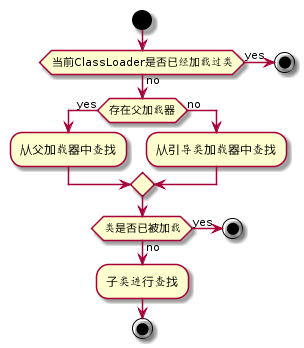
  • 1处 通过 native (VMClassLoader实现)手段检测当前 ClassLoader 是否已经加载过该类, 如果加载过则直接返回。
  • 2处 当且仅当 ClassLoader 没有加载过类且父加载器存在时, 尝试调用 parent#loadClass 获取
  • 3处 当且仅当 ClassLoader 没有加载过类且父加载器不存在时, 尝试通过 native 手段从引导类加载器获取
  • 如果上述途径都没有获取到, 则 findClass 获取, 默认方法内抛出异常, 子类需要实现覆盖实现自己的逻辑。

活动图如下
图片名称

值得注意的是, loadClass 一个 protected 权限级别的方法, 这意味着 ”双亲委派模型“ 并不是唯一的加载模式而是系统建议我们使用的模式。

再来看看 Java 和 Android 平台提供哪些类加载器, 以 Android 加载器的内容重点展开。

Java 流派

Java系统主要提供了 3 种类加载器

  1. Bootstrap Classloader ,启动类加载器,负责加载 \lib 目录下或者被 -Xbootclasspath参数所指定的路径种的,能被虚拟机识别的类库 (即所有 java.* 开头的类)。
  2. Extension Classloader ,扩展类加载器,负责加载 \lib\ext 目录下或者被 java.ext.dirs 系统变量指定路径的类库(例如所有 javax.* 开头的类和存放在 JRE 的 ext 目录下的类)。
  3. Application Classloader ,应用程序类加载器,负责加载用户类路径指定的类库,开发者可以直接使用这个类加载器(即我们自己写的 Java程序时新创建的类都是通过它来接在的)。

Android 流派

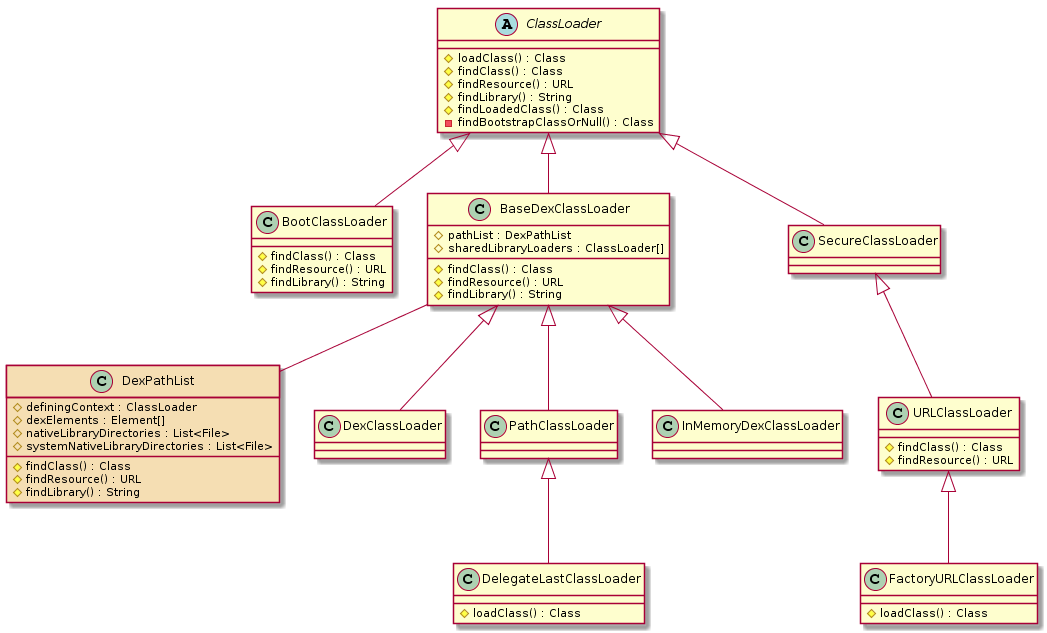
Android系统也提供了多种类加载器, 这些类加载器都由 java.lang.ClassLoader 继承而来。

ps: 本文所涉及到的源码均以 Andriod P 版本作为展开分析

以 Android 类加载为例子,这里画了类图方便直观预览。
图片名称

上述类图除了橙色的 DexPathList 类之外, 其他都是 Android 提供的类加载器。按照 Java 系统类加载器的划分, Android 类加载器大致也可以划分 3 种类加载器。

  1. 加载 Framework 层类, BootClassLoader 为该类型类加载器, 在 Android 系统启动的时候创建该实例, 当应用程序系统也需要用到 Framework 类是会传递该类加载器实例给应用层。
  2. 加载已经安装的 apk 中的类, PathClassLoader 为该类型类加载器。
  3. 加载jar/apk/dex,未安装过的 apk 中的类, DexClassLoader 或 PathClassLoader 为该类型类加载器。

这里可能和你平时在网上看到的结论是不一样的, PathClassLoader 也可以加载外部 dex 了? 肯定的啊。 看下面分析。

BaseDexClassLoader

Android 应用层的类加载逻辑基本围绕 `BaseDexClassLoader` 及子类开展的, 也是应用层开发热修复, 插件化技术中重要的技术基础。下面重点分析这部分内容, 在掌握这部分知识之前, 希望我们能达成一致的共识 “带着问题在源码中找答案”。

待解决的问题 :

  • BaseDexClassLoader的设计初衷是什么?
  • 如何加载 Dex 文件 ?
  • 子类的应用场景是什么 ?
  • 实际开发过程我们可以如何使用 ?

设计初衷

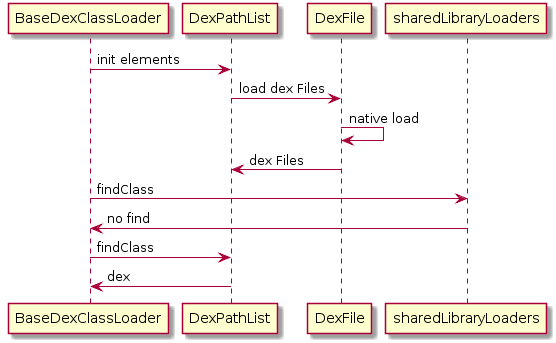
由于移动端架构及性能原因, Android 针对 class 文件进一步优化形成 dex 文件。 为了适配加载 dex 文件, BaseDexClassLoader 应运而生。 在BaseDexClassLoader.DexPathList 源码中可知, BaseDexClassLoader 加载 dex 实际上是委托 DexPathList 对象进行的。

如何加载 Dex 文件

在 BaseDexClassLoader 中有一个重要的成员变量 pathList, 是一个 DexPathList 类型对象。结合 BaseDexClassLoader.DexPathList源码及类图可以理解, DexPathList 托管处理了 BaseDexClassLoader 查找资源的过程。

1
2
3
4
5
6
7
8
9
10
11
12
13
14
15
16
17
18
19
20
21
22
23
24
25
26
27
28
29
30
31
32
33
34
35
36
37
38
39
40
41
42
43
44
45
46
47
48
49
50
51
52
53
54
55
56
57
58
59
60
61
62
63
64
//from BaseDexClassLoader.java 部分源码做过删减
public BaseDexClassLoader(String dexPath, File optimizedDirectory,
String librarySearchPath, ClassLoader parent) {
super(parent);
this.pathList = new DexPathList(this, dexPath, librarySearchPath, optimizedDirectory);
}

public BaseDexClassLoader(ByteBuffer[] dexFiles, String librarySearchPath, ClassLoader parent) {
super(parent);
this.pathList = new DexPathList(this, dexFiles, librarySearchPath);
this.sharedLibraryLoaders = null;
}

@Override
public String findLibrary(String name) {
return pathList.findLibrary(name);
}

@Override
protected Class<?> findClass(String name) throws ClassNotFoundException {

if (sharedLibraryLoaders != null) {
for (ClassLoader loader : sharedLibraryLoaders) {
try {
return loader.loadClass(name);
} catch (ClassNotFoundException ignored) {
}
}
}
return pathList.findClass(name, suppressedExceptions);
}

@Override
protected URL findResource(String name) {
if (sharedLibraryLoaders != null) {
for (ClassLoader loader : sharedLibraryLoaders) {
URL url = loader.getResource(name);
if (url != null) {
return url;
}
}
}
return pathList.findResource(name);
}

@Override
protected Enumeration<URL> findResources(String name) {
Enumeration<URL> myResources = pathList.findResources(name);
if (sharedLibraryLoaders == null) {
return myResources;
}
Enumeration<URL>[] tmp =
(Enumeration<URL>[]) new Enumeration<?>[sharedLibraryLoaders.length + 1];
for (int i = 0; i < sharedLibraryLoaders.length; i++) {
try {
tmp[i] = sharedLibraryLoaders[i].getResources(name);
} catch (IOException e) {
// Ignore.
}
}
tmp[sharedLibraryLoaders.length] = myResources;
return new CompoundEnumeration<>(tmp);
}

在创建 BaseDexClassLoader 对象的同时也创建了 DexPathList 对象。 sharedLibraryLoaders 是共享的 Loader 数组, 在查找 Resource 和 Class 是优先从 sharedLibraryLoaders 中获取, 这些 Loader 也是调用各自的查找方法, 最终会依赖 DexPathList 对象进行查找。

在熟悉 DexPathList 之前看下其构造器。

1
2
3
4
5
6
7
8
9
private Element[] dexElements;

public DexPathList(ClassLoader definingContext, ByteBuffer[] dexFiles,String librarySearchPath) {
//...
}

DexPathList(ClassLoader definingContext, String dexPath, String librarySearchPath, File optimizedDirectory) {
//...
}
  • definingContext 为关联的 ClassLoader
  • dexFiles 内存中已经存在的 dex 缓存
  • librarySearchPath native 库的路径
  • optimizedDirectory 存放优化过的 dex 文件

dexElements 是存放加载过的 dex 或 resource 资源。

下面重点看下 findClass 逻辑

1
2
3
4
5
6
7
8
9
10
11
12
13
14
15
16
17
18
19
20
21
22
23
24
25
26
27
public Class<?> findClass(String name, List<Throwable> suppressed) {
for (Element element : dexElements) {
Class<?> clazz = element.findClass(name, definingContext, suppressed);
if (clazz != null) {
return clazz;
}
}
if (dexElementsSuppressedExceptions != null) {
suppressed.addAll(Arrays.asList(dexElementsSuppressedExceptions));
}
return null;
}

static class Element {
/**
* A file denoting a zip file (in case of a resource jar or a dex jar), or a directory
* (only when dexFile is null).
*/
@UnsupportedAppUsage
private final File path;
/** Whether {@code path.isDirectory()}, or {@code null} if {@code path == null}. */
private final Boolean pathIsDirectory;
@UnsupportedAppUsage
private final DexFile dexFile;
private ClassPathURLStreamHandler urlHandler;
private boolean initialized;
}

Element是一个静态类, 封装了一个 Dex 单元. 而 findClass 从 dexElements 数组中获取, 所以追踪 dexElements 初始化。

makeInMemoryDexElements 方法直接读取 dexFiles(ByteBuffer[]), 类似于写文件。makeDexElements 则是从特定 path 下读取 dex 。

1
2
3
4
5
6
7
8
9
10
11
12
13
14
15
16
17
18
19
20
21
22
23
24
25
26
27
28
29
30
31
32
33
34
35
36
37
38
39
40
41
42
43
44
45
46
47
48
49
50
51
52
53
54
55
56
57
58
59
60
61
62
63
64
65
66
67
68
69
70
71
72
73
private static Element[] makeDexElements(List<File> files, File optimizedDirectory,
List<IOException> suppressedExceptions, ClassLoader loader, boolean isTrusted) {
Element[] elements = new Element[files.size()];
int elementsPos = 0;

for (File file : files) {
if (file.isDirectory()) {
elements[elementsPos++] = new Element(file);
} else if (file.isFile()) {
String name = file.getName();
DexFile dex = null;

// 以 .dex 结尾
if (name.endsWith(DEX_SUFFIX)) {
try {
dex = loadDexFile(file, optimizedDirectory, loader, elements);
if (dex != null) {
elements[elementsPos++] = new Element(dex, null);
}
} catch (IOException suppressed) {
}
} else {
try {
dex = loadDexFile(file, optimizedDirectory, loader, elements);
} catch (IOException suppressed) {
}
if (dex == null) {
elements[elementsPos++] = new Element(file);
} else {
elements[elementsPos++] = new Element(dex, file);
}
}
if (dex != null && isTrusted) {
dex.setTrusted();
}
} else {
System.logW("ClassLoader referenced unknown path: " + file);
}
}
if (elementsPos != elements.length) {
elements = Arrays.copyOf(elements, elementsPos);
}
return elements;
}

private static DexFile loadDexFile(File file, File optimizedDirectory, ClassLoader loader,
Element[] elements)
throws IOException {
if (optimizedDirectory == null) {
return new DexFile(file, loader, elements);
} else {
String optimizedPath = optimizedPathFor(file, optimizedDirectory);
return DexFile.loadDex(file.getPath(), optimizedPath, 0, loader, elements);
}
}

private static String optimizedPathFor(File path,
File optimizedDirectory) {
String fileName = path.getName();
if (!fileName.endsWith(DEX_SUFFIX)) {
int lastDot = fileName.lastIndexOf(".");
if (lastDot < 0) {
fileName += DEX_SUFFIX;
} else {
StringBuilder sb = new StringBuilder(lastDot + 4);
sb.append(fileName, 0, lastDot);
sb.append(DEX_SUFFIX);
fileName = sb.toString();
}
}
File result = new File(optimizedDirectory, fileName);
return result.getPath();
}

从 dexPath 中读取文件数组之后, 无论是否以 .dex 后缀结尾的文件, 都通过 loadDexFile 方法进行读取。唯一不同的地方在于, 当 optimizedDirectory 不为 null 时则通过 DexFile.loadDex 加载, 否则直接 new 一个 DexFile 对象。

optimizedPathFor 是用于转换文件后缀名的。 如果文件没有带.标识符则默认拼接 .dex 后缀, 否则则改写后缀为 .dex。 这样做得意义在于虚拟机能通过后缀名识别包含 dex 的文件提高读取效率。

DexFile.java 是如何加载 dex 的呢?

1
2
3
4
5
6
7
8
9
10
11
12
13
14
15
16
17
18
19
20
21
22
23
24
25
26
27
28
29
30
31
32
33
private DexFile(String sourceName, String outputName, int flags, ClassLoader loader,
DexPathList.Element[] elements) throws IOException {
if (outputName != null) {
try {
String parent = new File(outputName).getParent();
if (Libcore.os.getuid() != Libcore.os.stat(parent).st_uid) {
throw new IllegalArgumentException("Optimized data directory " + parent
+ " is not owned by the current user. Shared storage cannot protect"
+ " your application from code injection attacks.");
}
} catch (ErrnoException ignored) {
// assume we'll fail with a more contextual error later
}
}
mCookie = openDexFile(sourceName, outputName, flags, loader, elements);
mInternalCookie = mCookie;
mFileName = sourceName;
}

private static Object openDexFile(String sourceName, String outputName, int flags,
ClassLoader loader, DexPathList.Element[] elements) throws IOException {
// Use absolute paths to enable the use of relative paths when testing on host.
return openDexFileNative(new File(sourceName).getAbsolutePath(),
(outputName == null)
? null
: new File(outputName).getAbsolutePath(),
flags,
loader,
elements);
}

private static native Object openDexFileNative(String sourceName, String outputName, int flags,
ClassLoader loader, DexPathList.Element[] elements);

DexPathList#loadDexFile 最终都是调用的是 DexFile 构造器。optimizedDirectory 不为 null 的场景下:outputName 为 null 且 flags 为 0。 openDexFileNative 是一个 native 方法。

nativa 方法如何追踪呢, 下载 aosp源代码之后, 使用 vs 进行预览。 DexFile 的包名为 “dalvik.system”, 则 native 文件名为 “dalvik_sytem_DexFile” 搜索一下就定位到了。 其中 DexFile_openDexFileNative 方法就是对应的 native 方法。

native 代码在虚拟机内部。dalvik_system_DexFile.cc 为官方源码。有兴趣可以 dowm 下来看看。

下面为整个 dex 加载流程的时序图.
图片名称

子类应用场景

BaseDexClassLoader的众多子类并没有覆盖其任何方法, 唯一不同的地方在于每个子类的构造器调用 super 参数不一致。

1
2
3
4
5
6
7
8
9
10
11
12
13
14
15
16
17
18
19
20
21
22
23
24
25
26
27
//from PathClassLoader.java
public PathClassLoader(String dexPath, ClassLoader parent) {
super(dexPath, null, null, parent);
}
public PathClassLoader(String dexPath, String librarySearchPath, ClassLoader parent) {
super(dexPath, null, librarySearchPath, parent);
}

//from DexClassLoader.java
public DexClassLoader(String dexPath, String optimizedDirectory,
String librarySearchPath, ClassLoader parent) {
super(dexPath, null, librarySearchPath, parent);
}

//from InMemoryDexClassLoader
public InMemoryDexClassLoader(@NonNull ByteBuffer @NonNull [] dexBuffers,
@Nullable String librarySearchPath, @Nullable ClassLoader parent) {
super(dexBuffers, librarySearchPath, parent);
}
public InMemoryDexClassLoader(@NonNull ByteBuffer @NonNull [] dexBuffers,
@Nullable ClassLoader parent) {
this(dexBuffers, null, parent);
}
public InMemoryDexClassLoader(@NonNull ByteBuffer dexBuffer, @Nullable ClassLoader parent) {
this(new ByteBuffer[] { dexBuffer }, parent);
}

可以确定的是 InMemoryDexClassLoader 不从 dexPath 路径中加载 dex 文件而是从 dex 缓存内容中读取。 但是 DexClassLoader 和 PathClassLoader 存在一样的构造器啊。翻开 BaseDexClassLoader 文档一开

1
optimizedDirectory	File: this parameter is deprecated and has no effect since API level 26.

optimizedDirectory 在 8.0 版本废弃会有什么影响呢 ? optimizedDirectory 是存放被优化过的 dex。在 dex 文件首次被加载的时候, 虚拟机会执行 dexopt 操作, 而 * optimizedDirectory* 就是优化后的odex文件的存放目录。在 native 加载 dex过程中, 如果 outputName 参数为 null 时则默认把优化后的的dex保存在为 /data/dalvik-cache/xxx@classes.dex。 而 PathClassLoader 默认 outputName 参数为 null, 则 app 启动加载dex生成的优化文件正是存放在 /data/dalvik-cache/xxx@classes.dex 。8.0 之前 DexClassLoader 可以指定生成 odex 文件存放的目录,而 8.0 之后则不可以了, 默认都存在 /data/dalvik-cache/xxx@classes.dex。 从官网最新的文档上可以看到

1
2
3
4
5
6
7
8
9
10
11
12
13
14
15
16
17
18
19
20
//from PathClassLoader.java
* Provides a simple {@link ClassLoader} implementation that operates on a list
* of files and directories in the local file system, but does not attempt to
* load classes from the network. Android uses this class for its system class
* loader and for its application class loader(s).

//from DexClassLoader.java
* A class loader that loads classes from {@code .jar} and {@code .apk} files
* containing a {@code classes.dex} entry. This can be used to execute code not
* installed as part of an application
* Prior to API level 26, this class loader requires an
* application-private, writable directory to cache optimized classes.
* Use {@code Context.getCodeCacheDir()} to create such a directory:
* <pre> {@code
* File dexOutputDir = context.getCodeCacheDir();
* }</pre>
*
* <p><strong>Do not cache optimized classes on external storage.</strong>
* External storage does not provide access controls necessary to protect your
* application from code injection attacks

就是为了保证新版本DexClassLoader 加载生成的 odex 文件不被随便存放, 其目的是为了避免加载的内容会对应用造成攻击。

这里放一下 app 默认的 PathClassLoader 加载流程:

  1. ActivityThread#handleBindApplication
  2. ContextImpl#getClassLoader
  3. LoadedApk#makePaths(计算dexPath) -> LoadedApk#getClassLoader
  4. ApplicationLoaders#getClassLoader
  5. PathClassLoaderFactory#createClassLoader
  6. PathClassLoader#构造器

有兴趣的朋友可以翻阅源码查看。

在 api 27 (Android 8.1) 中新增 DelegateLastClassLoader, 该类继承 PathClassLoader 。在 委托加载 章节中最后提到, “双亲委派模型”的加载并不是唯一的方式, 而 DelegateLastClassLoader 就是最好的证明。

1
2
3
4
5
6
7
8
9
10
11
12
13
14
15
16
17
18
19
20
21
22
23
24
25
26
27
28
29
30
31
32
//from DelagateLastClassLoader.java

@Override
protected Class<?> loadClass(String name, boolean resolve) throws ClassNotFoundException {

// 1
Class<?> cl = findLoadedClass(name);
if (cl != null) {
return cl;
}

// 2
try {
return Object.class.getClassLoader().loadClass(name);
} catch (ClassNotFoundException ignored) {
}

// 3
ClassNotFoundException fromSuper = null;
try {
return findClass(name);
} catch (ClassNotFoundException ex) {
fromSuper = ex;
}

// 4
try {
return getParent().loadClass(name);
} catch (ClassNotFoundException cnfe) {
throw fromSuper;
}
}
  • 1处 通过 native (VMClassLoader实现)手段检测当前 ClassLoader 是否已经加载过该类, 如果加载过则直接返回。
  • 2处 尝试通过 native 手段从引导类加载器获取
  • 3处 则 findClass 获取, 默认方法内抛出异常, 子类需要实现覆盖实现自己的逻辑
  • 4处 则尝试调用 parent#loadClass 获取

实际开发的应用

插桩实现

广为人知的 Qzone 补丁方案就是通过插桩实现热修复, 下面为伪代码(8.0版本之前), 略去反射实现

1
2
3
4
5
6
7
8
9
10
11
12
13
14
// 1
String dexPath = "补丁路径";
String dexoptPath = "xxxx/dexopt/";
DexClassLoader dexClassLoader = new DexClassLoader(dexPath, dexoptPath, dexoptPath, getClassLoader());
DexPathList newPathList = dexClassLoader.pathList ;
Element[] newElements = newPathList.elements;

// 2
DexPathList currentPathList = getBaseDexClassLoader().pathList;
Element[] currentElements = pathList.elements;

// 3
Element[] resultElements = mergeElement(newElements, currentElements);
pathList.elements = resultElements;
  • 1处 加载补丁 dex
  • 2处 反射获取当前 dex 数组
  • 3处 把补丁 dex 查到 当前 dex 数组前面

这样一来, 在 DexPathList#findClass 过程中, 新插入的 element 元素就会优先被遍历到使用。

但是, 如果 currentElements 中某个 dex 中的类 A 持有 newElements 中某个 dex 中的类 B 的引用, 运行时会出现 Class ref in pre-verified clas resolved to unexpected implementation 。了解原因前得清楚虚拟机在 native 加载类的时候大致会做哪些工作。

  1. dexopt 会进行类校验 。比如校验 A 中 “static 方法,private 方法,构造函数,虚函数第一层引用 (c++)” 是否存在对某些类的引用且他们和 A 是在同个dex。 如果是则 A 会打上 “CLASS_ISPREVERIFIED” 。

  2. 虚拟机加载类的顺序为: dvmResolveClass -> dvmLinkClass -> dvmInitClasss 。 在 dvmResolveClass 会校验如果类被打上 CLASS_ISPREVERIFIED,则需要检验其引用类是否是同一个 dex ,不在同个 dex 则抛出 Exception。

既然如此, 那么就在 A 的 “static 方法,private 方法,构造函数,虚函数第一层引用 (c++)” 中任意一处引用另外一个 dex 的某个类来防止 A 被打上 “CLASS_ISPREVERIFIED”。 可以借助 gradle 入侵 dex 打包流程, 利用字节码技术对所有类的构造器插入对该 dex 中某个类的引用进而解决问题。

tinker Android N 类加载

Android_N混合编译与对热补丁影响解析 中一文已经明确指出 “无论是使用插入pathlist还是parent classloader的方式,若补丁修改的class已经存在与app image,它们都是无法通过热补丁更新的。它们在启动app时已经加入到PathClassLoader的ClassTable中,系统在查找类时会直接使用base.apk中的class。”

为了解决这种问题, tinker 团队选择在 Android N 及以上版本采用 “运行时替换PathClassLoader方案” 以达到废除 cache 效果。

SystemClassLoaderAdder#installDexes 中针对版本构建不同的 ClassLoader 对象。

1
2
3
4
5
6
7
8
9
10
11
12
13
14
15
16
17
18
public static void installDexes(Application application, PathClassLoader loader, File dexOptDir, List<File> files)
throws Throwable {
// ...
if (!files.isEmpty()) {
files = createSortedAdditionalPathEntries(files);
ClassLoader classLoader = loader;
if (Build.VERSION.SDK_INT >= 24 && !checkIsProtectedApp(files)) {
classLoader = AndroidNClassLoader.inject(loader, application);
}
}
//...
}

public static AndroidNClassLoader inject(PathClassLoader originClassLoader, Application application) throws Exception {
AndroidNClassLoader classLoader = createAndroidNClassLoader(originClassLoader, application);
reflectPackageInfoClassloader(application, classLoader);
return classLoader;
}

在 Android N 上选择 AndroidNClassLoader 。

1
2
3
4
5
6
7
8
9
10
11
12
13
14
15
16
17
18
19
20
21
private static AndroidNClassLoader createAndroidNClassLoader(PathClassLoader originalClassLoader, Application application) throws Exception {
// 1
final AndroidNClassLoader androidNClassLoader = new AndroidNClassLoader("", originalClassLoader, application);

// 2
final Field pathListField = ShareReflectUtil.findField(originalClassLoader, "pathList");
final Object originPathList = pathListField.get(originalClassLoader);

// 3
Object newPathList = recreateDexPathList(originPathList, androidNClassLoader, false);

// 4
pathListField.set(androidNClassLoader, newPathList);

// 5
ShareReflectUtil.findField(originPathList, "definingContext").set(originPathList, androidNClassLoader);

oldDexPathListHolder = originPathList;

return androidNClassLoader;
}
  • 1处 创建 androidNClassLoader 对象
  • 2处 反射获取原来的 originPathList 对象
  • 3处 通过反射取出 originPathList 对象的各个属性信息并反射构建一个新的 DexPathList 对象
  • 4处 DexPathList 对象关联 androidNClassLoader
  • 5处 androidNClassLoader 持有 DexPathList 对象

而在 findClass 过程中针对 application, tinker 库内的 loader 及一些特殊库文件, 默认使用 PathClassLoader 加载, 其他的优先使用 androidNClassLoader 查找。

1
2
3
4
5
6
7
8
9
10
11
12
13
14
15
16
17
18
19
20
21
22
23
24
25
26
27
28
29
30
31
32
33
34
35
36
37
38
39
public Class<?> findClass(String name) throws ClassNotFoundException {
if (applicationClassName != null && applicationClassName.equals(name)) {
return originClassLoader.loadClass(name);
} else if (name != null && name.startsWith("com.tencent.tinker.loader.")
&& !name.equals(SystemClassLoaderAdder.CHECK_DEX_CLASS)) {
return originClassLoader.loadClass(name);
} else if (name != null && name.startsWith("org.apache.http.")) {
// Here's the whole story:
// Some app use apache wrapper library to access Apache utilities. Classes in apache wrapper
// library may be conflict with those preloaded in BootClassLoader.
// So with the build option:
// useLibrary 'org.apache.http.legacy'
// appears, the Android Framework will inject a jar called 'org.apache.http.legacy.boot.jar'
// in front of the path of user's apk. After that, PathList in app's PathClassLoader should
// look like this:
// ["/system/framework/org.apache.http.legacy.boot.jar", "path-to-user-apk", "path-to-other-preload-jar"]
// When app runs to the code refer to Apache classes, the referred classes in the first
// jar override those in user's app, which avoids any conflicts and crashes.
//
// When it comes to Tinker, to block the cached instances in class table of app's
// PathClassLoader we use this AndroidNClassLoader to replace the original PathClassLoader.
// At the beginning it's fine to imitate system's behavior and construct the PathList in AndroidNClassLoader
// like below:
// ["/system/framework/org.apache.http.legacy.boot.jar", "path-to-new-dexes", "path-to-other-preload-jar"]
// However, the ART VM of Android P adds a new feature that checks whether the inlined class is loaded by the same
// ClassLoader that loads the callsite's class. If any Apache classes is inlined in old dex(oat), after we replacing
// the App's ClassLoader we will receive an assert since the Apache classes is loaded by another ClassLoader now.
return originClassLoader.loadClass(name);
}
try {
return super.findClass(name);
} catch (ClassNotFoundException e) {
// Some jars/apks other than base.apk was removed from AndroidNClassloader's dex path list.
// So if target class cannot be found in AndroidNClassloader, we should fallback to try
// original PathClassLoader for compatibility.
// Obviously this behavior violates the Parent Delegate Model, but it doesn't matter.
return originClassLoader.loadClass(name);
}
}

鉴于自己能力有限,如果本文中有遗漏或者错误的地方,请在评论区指出或者通过 yummyl.lau@gmail.com 邮件联系我,感谢。